Schedule Blocker
Your apps close on time. Extra minutes cost a slow breath.
Overview
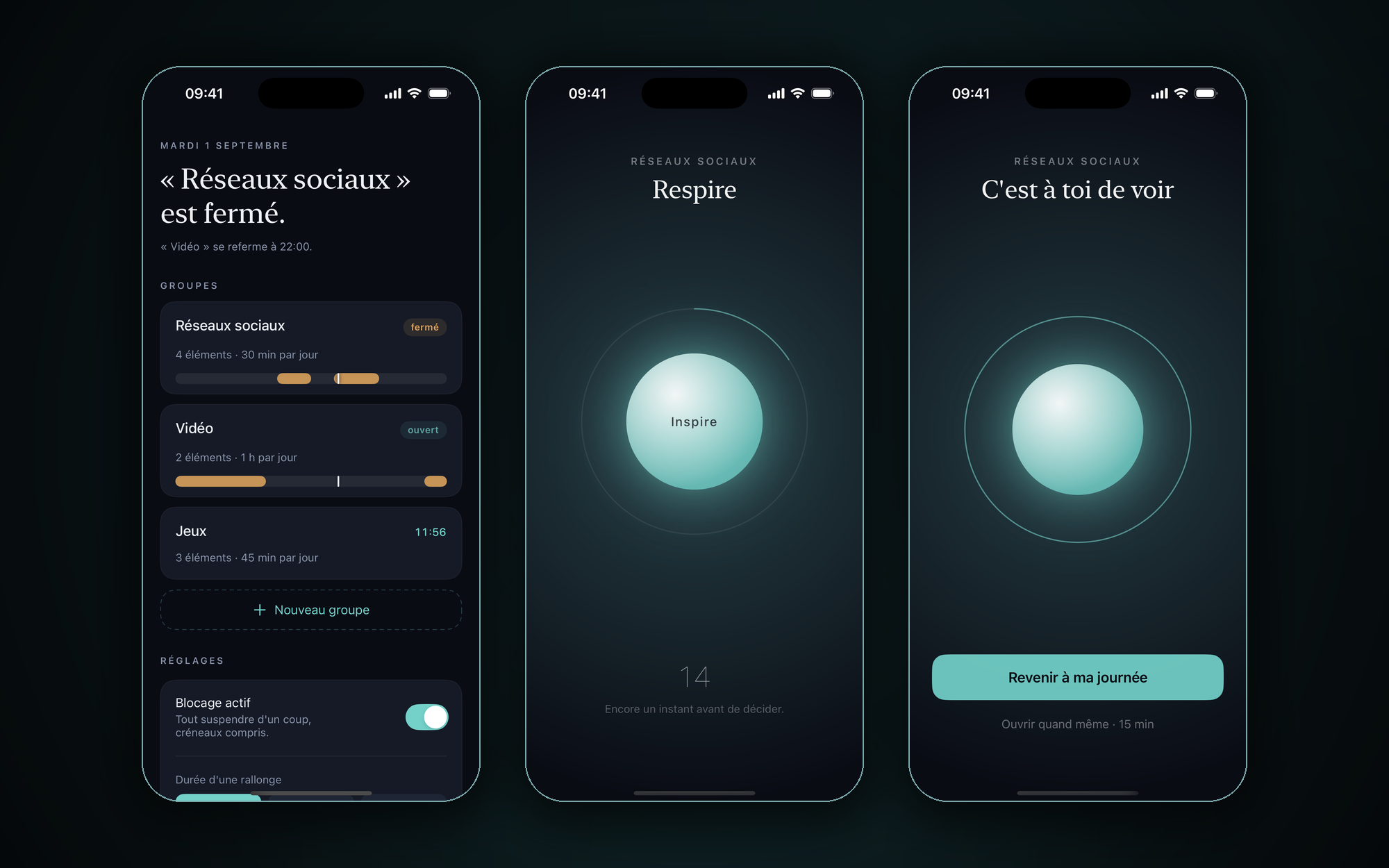
Schedule Blocker is a native iOS app built on Apple's Screen Time API. It closes groups of apps during weekly time slots and once their daily quota runs out, and iOS enforces the block even when the app isn't running. Each group draws its day as a 24-hour band, with today's closed slots in amber and a cursor on the current time. When a quota runs out, the group stays shut until tomorrow. You can still earn a 15-minute extension, but only through a guided breathing ritual that ends on a real choice, back to your day or open anyway.
Why I built this
I wanted to cut down my own doomscrolling without paying a subscription for a blocker. The ones I tried either guilt-tripped me in red or gave in after a single tap. So I built the one I wanted, calm and strict and never red. Unlocking costs sixteen seconds of breathing, which is usually enough to change your mind.
Features
- Groups, schedules and quotas. Each group of apps has its own weekly time slots and daily time budget, enforced by iOS itself through Family Controls. The block survives reboots and force-quits because the system holds the shield.
- The 24-hour band. Every group draws its day as a band, with today's closed slots in amber and a cursor on the current hour. There's no progress gauge. The Screen Time API only reports when a threshold is crossed, so a "time used" bar would be made up.
- Breathing to unlock. Once a quota is spent, you can earn 15 more minutes through a 16-second guided breath. It ends on a deliberate choice, "back to my day" or "open anyway", which leaves you time to change your mind.
- Per-group extensions. Every group owns its own ManagedSettingsStore. Restrictions from several stores stack, so an extension for one group never unlocks the others.
- Shield → notification relay. Apple gives shield extensions no way to open the host app. So the shield button posts a local notification that takes you into the ritual, and a one-shot DeviceActivity puts the block back when the extension ends. Neither side needs the app process running.